
9.7 KiB
Scripting
This documentation describes the most common ways to interact with the Localization System via C# scripts, further examples can be found in the Scripting API documentation.
You can download additional scripting examples from the package manager window, in the Localization package’s Samples section.
LocalizedString
A LocalizedString accesses specific entries from within a String Table.
You can use the LocalizedString in a user script. It serializes and displays its own editor, which you can use to select the table and table entry, and edit the localized values inline, without opening the Tables window.

The LocalizedString provides a UnityEngine.Localization.LocalizedString.StringChanged event. The script calls the event whenever the selected Locale changes. This makes your code simpler and more efficient, because the script only calls it when it needs to update the LocalizedString.
[!code-cslocalized-string-events]
Dynamic Strings
Sometimes you might need to update a localized string, such as when using Smart Strings or String.Format with arguments that have since changed. Calling GetLocalizedString with the arguments always updates the string. When you use the StringChanged event, you can use the RefreshString function to request an update, and the Arguments property to configure the arguments that format the string.
[!code-cslocalized-string-smart]
LocalizedAsset
LocalizedAsset is a generic class that accesses localized versions of Unity assets from within an Asset Table.
You can use the LocalizedAsset in a user script. It serializes and displays its own editor, which you can use to select the table and table entry, and edit the localized values inline, without opening the Tables window.
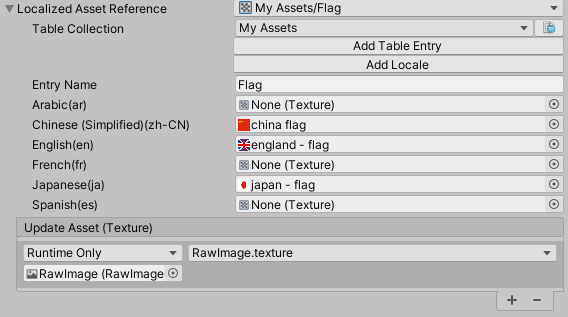
The LocalizedAsset provides an AssetChanged event. The script calls the event whenever a new localized asset is available, such as when the game language changes. This makes your code simpler and more efficient, because the script only calls it when it needs to update the LocalizedAsset.
To use a LocalizedAsset, you need to create a concrete version of the class and mark it as Serializable.
For example, to support localizing font assets, you could define the following class:
[!code-cslocalized-font]
In this example, you can now add LocalizedFont to a script, and LocalizedAsset will call the AssetChanged event when a localized Font asset is available.
The following Unity assets are already supported:
TableReference
Use the TableReference struct to reference an Asset Table or String Table. To reference a table, you can use either the table's name or its unique GUID. It is usually safer to use the GUID, because you might decide to change the table name in future, which would require you to manually update your references, but the GUID always stays the same.
TableEntryReference
Use the TableEntryReference struct to reference an entry in an Asset Table or String Table. To reference a table, you can use either the table entry's name or its unique Key ID, an unsigned long integer. It is usually safer to use the Key ID, because you might decide to change the table entry name in future, which would require you to manually update your references, but the Key ID always stays the same.
Using AsyncOperationHandle
Unity does not hold all localized assets in memory ready for use. Instead, it loads them on demand when it needs them, and unloads them when it no longer needs them. Because of this, localized Assets might not be immediately available, and Unity might need to load them from disk or fetch them from a server. To facilitate this, Unity uses the AsyncOperationHandle as an interface to all requests.
When an Asset is not immediately available, the localization system returns an AsyncOperationHandle. When the operation has finished, the AsyncOperationHandle provides a Completed event to notify Unity. It calls this during LateUpdate. If the request has already completed (for example, when the requested data is already loaded from a previous request, or during preloading), you can check the IsDone property for immediate access via the Result property. Alternatively, the Completed event still occurs in LateUpdate, allowing for all code to follow the same path. You can also yield on an AsyncOperationHandle inside a coroutine.
To force an operation to complete on the main thread, call WaitForCompletion. See Synchronous Workflow for further details.
Make a basic Locale selection menu
This example demonstrates how to create a way for the person playing a game to select the language (defined in the Localization system by Locale) they want to use in the game. To add a UI dropdown menu to the Scene, go to GameObject > UI > Dropdown, and attach the following script:
[!code-cslocale-dropdown]
You can see a more advanced version of this script in the Localization package samples.
Custom Table loading
This example demonstrates how the ITableProvider can be used to provide a custom String Table without using the Addressables system. This approach is particularly useful when you want to allow users to add third party content, such as modding. The localization data could be loaded from an external file and then converted into a table at runtime.
[!code-csupdate-collection]
The CustomTableProvider can be applied to handle String Tables or Asset Tables:
[!code-csupdate-collection]
Applying changes to a table after the game is built
This example demonstrates how the ITablePostprocessor can be used to apply changes to a table after it has loaded but before it has been used. This can be beneficial when you wish to modify or add additional entries to a table, such as when supporting third party content (modding).
[!code-csupdate-collection]
The CustomTablePatcher can be applied to handle String Tables or Asset Tables:
[!code-csupdate-collection]
Editor
Use the Editor scripting class LocalizationEditorSettings to make changes to Localization assets.
The following example shows how to update a collection by adding support for a new Locale.
[!code-csupdate-collection]