
1.6 KiB
1.6 KiB
Sub String Formatter
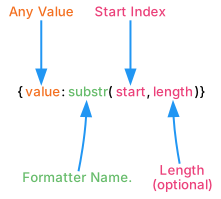
Use SubString Formatter to output parts of an input string. If the value is not a string it is first converted to one using the value’s ToString method.
| Field | Description |
|---|---|
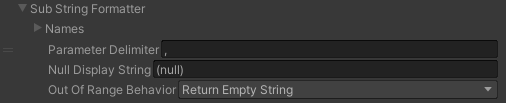
| Parameter Delimiter | The character used to separate the start and length value. By default it uses a comma. |
| Null Display String | The string to display if the string being formatter is null. |
| Out Of Range Behavior | Defines what to do if the substring position or length goes out of the range of the provided string.
|
| Example Smart String | Arguments | Result |
|---|---|---|
| {0:substr(5)} | "Long John" |
John |
| {0:substr(0, 3)} | "New York" |
New |
| Hello {name:substr(1)} {surname} | Hello L Croft |