
4.1 KiB
4.1 KiB
Time Formatter
Use the Time Formatter to format a DateTime or TimeSpan object.
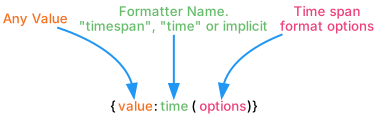
You can combine options using the pipe symbol (|), for example (less|week).)The following options are available:
| Option | Description |
|---|---|
| w week weeks |
Shows the range in weeks. You can combine two range values to form the minimum and maximum for the range. Example: (RangeMinutes) defines a range of Minutes only; (RangeHours |
| d day days |
Shows the range in days. You can combine two range values to form the minimum and maximum for the range. Example: (RangeMinutes) defines a range of Minutes only; (RangeHours |
| h hour hours |
Shows the range in hours. You can combine two range values to form the minimum and maximum for the range. Example: (RangeMinutes) defines a range of Minutes only; (RangeHours |
| m minute minutes |
Shows the range in minutes. You can combine two range values to form the minimum and maximum for the range. Example: (RangeMinutes) defines a range of Minutes only; (RangeHours |
| s second seconds |
Shows the range in seconds. You can combine two range values to form the minimum and maximum for the range. Example: (RangeMinutes) defines a range of Minutes only; (RangeHours |
| ms millisecond milliseconds |
Shows the range in milliseconds. You can combine two range values to form the minimum and maximum for the range. Example: (RangeMinutes) defines a range of Minutes only; (RangeHours |
| short | Displays the highest non-zero value within the range. Example: "00.23:00:59.000" = "23 hours" |
| auto | Displays all non-zero values within the range. Example: "00.23:00:59.000" = "23 hours 59 minutes" |
| fill | Displays the highest non-zero value and all lesser values within the range. Example: "00.23:00:59.000" = "23 hours 0 minutes 59 seconds 0 milliseconds" |
| full | Displays all values within the range. Example: "00.23:00:59.000" = "0 days 23 hours 0 minutes 59 seconds 0 milliseconds" |
| abbr | Abbreviates units. Example: "1d 2h 3m 4s 5ms" |
| noabbr | Does not abbreviate units. Example: "1 day 2 hours 3 minutes 4 seconds 5 milliseconds" |
| less | Displays "less than 1 (unit)" when the TimeSpan is smaller than the minimum range. |
| noless | Displays "0 (units)" when the TimeSpan is smaller than the minimum range. |
Note
When no options are provided, the default options that are used are: (noabbr|less|auto|seconds|days)
Note
The time values are not localized and are only available in English.
| Example Smart String | Arguments | Result |
|---|---|---|
| {0:time(abbr)} | 451d 6h 22m 5s | |
| {0:time(full)} | 451 days 6 hours 22 minutes 5 seconds | |
| {0:time(less\|weeks)} | Less than 1 week | |
| {0:time(less\|d\|h)} | 1 day 6 hours |