
12 KiB
UI Toolkit (Unity 6+)
Note
This feature requires Unity 6 and above.
The localization package provides UI Toolkit support through the data bindings system. When you bind a field, it automatically updates itself when you create the UI Document, change the selected locale, or change a persistent variable with a LocalizedString. You can add a localized binding in UI Builder, UXML, or C# script.
The following table lists the supported localization bindings:
UI Builder authoring
You can use the UI Builder to create and fine-tune UI assets and their associated data bindings, including localization data bindings. You can connect to visual element attribute fields or styles. You can also address mismatched data types smoothly by creating your own converters for data type conversion.
To bind an element's field to a localized value in UI Builder, do the following:
-
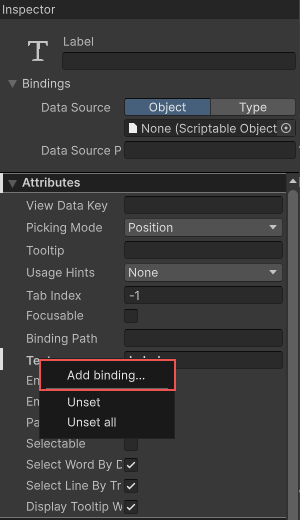
In the Inspector panel of an element, right-click on a field and select Add binding.
-
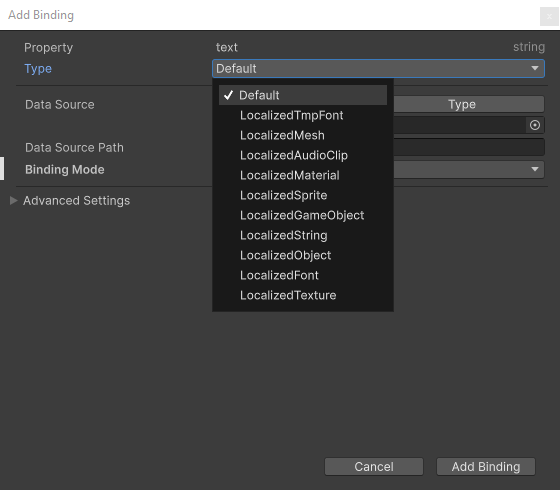
In the Add binding window, select the type of binding you want to use.
-
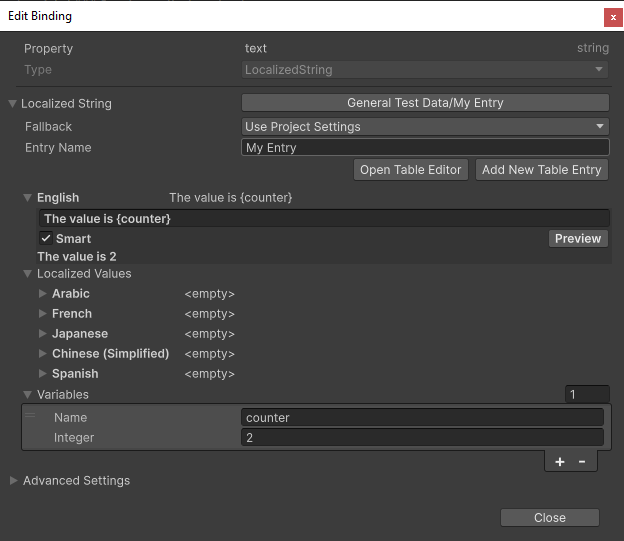
To set up the binding, specify the table and entry you want to reference. If you're using a LocalizedString binding and want to include local variables, you can do so through the Variables field.
Note
By default, the table and entry are referenced using the Guid and ID. To customize this behavior, go to Edit > Preferences > Localization and adjust the Table Reference Method and Entry Reference Method options.
-
The UI builder-generated UXML includes the new localized string binding like this:
<ui:UXML xmlns:ui="UnityEngine.UIElements">
    <ui:Label text="Label">
        <Bindings>
            <UnityEngine.Localization.LocalizedString property="text" table="General Test Data" entry="My Entry">
                <variables>
                    <UnityEngine.Localization.LocalVariable name="counter">
                        <UnityEngine.Localization.SmartFormat.PersistentVariables.IntVariable value="2" />
                    </UnityEngine.Localization.LocalVariable>
                </variables>
            </UnityEngine.Localization.LocalizedString>
        </Bindings>
    </ui:Label>
</ui:UXML>
UXML authoring
You can also use the following UXML structure to create a binding directly in UXML:
<ELEMENT>
    <Bindings>
        <BINDING-TYPE property="PROPERTY-PATH" table="TABLE-NAME-OR-GUID" entry="ENTRY-NAME-OR-ID" />
    </Bindings>
</ELEMENT>
The following example binds to a labels text, tooltip and style.backgroundImage fields:
<ui:UXML xmlns:ui="UnityEngine.UIElements">
    <ui:Label text="Label">
        <Bindings>
            <UnityEngine.Localization.LocalizedString property="text" table="GUID:27153e20147c06c4c8d1304d28104a87" entry="Id(328014486446080)" />
            <UnityEngine.Localization.LocalizedString property="tooltip" table="My Table" entry="My Tooltip" />
            <UnityEngine.Localization.LocalizedTexture property="style.backgroundImage" table="My Asset Table" entry="My Texture" />
        </Bindings>
    </ui:Label>
</ui:UXML>
In UXML, you can reference a table by either Guid or name. To reference by Guid, prefix the attribute value with "GUID:" like this: table="GUID:27153e20147c06c4c8d1304d28104a87".
Similarly, you can reference a table entry by either ID or name. To reference by ID, use this format for the attribute value: Id(1234), where the value within the parentheses represents the ID value.
You can add local variables to a LocalizedString under the variables element.
The following example shows an integer and bool local variables:
<ui:UXML xmlns:ui="UnityEngine.UIElements">
    <ui:Label text="Label">
        <Bindings>
            <UnityEngine.Localization.LocalizedString property="text" table="GUID:27153e20147c06c4c8d1304d28104a87" entry="Id(328014486446080)">
                <variables>
                    <UnityEngine.Localization.LocalVariable name="apple-count">
                        <UnityEngine.Localization.SmartFormat.PersistentVariables.IntVariable />
                    </UnityEngine.Localization.LocalVariable>
                    <UnityEngine.Localization.LocalVariable name="flag">
                        <UnityEngine.Localization.SmartFormat.PersistentVariables.BoolVariable value="true" />
                    </UnityEngine.Localization.LocalVariable>
                </variables>
            </UnityEngine.Localization.LocalizedString>
        </Bindings>
    </ui:Label>
</ui:UXML>
To simplify the UXML, define namespace prefixes like this:
<ui:UXML xmlns:ui="UnityEngine.UIElements" xmlns:l="UnityEngine.Localization" xmlns:lv="UnityEngine.Localization.SmartFormat.PersistentVariables">
    <ui:Label text="Label">
        <Bindings>
            <l:LocalizedString property="text" table="My Table" entry="My Entry">
                <variables>
                    <l:LocalVariable name="apple-count">
                        <lv:IntVariable />
                    </l:LocalVariable>
                    <l:LocalVariable name="flag">
                        <lv:BoolVariable value="true" />
                    </l:LocalVariable>
                </variables>
            </l:LocalizedString>
        </Bindings>
    </ui:Label>
</ui:UXML>
Scripting
You can manipulate bindings on an element through the Scripting API.
Add a binding
The following examples shows how to use the SetBinding method to add a new binding to an element:
To add a string binding:
[!code-csset-string-binding]
To add an asset binding:
[!code-csset-texture-binding]
Get an existing binding
You can update an existing binding, such as modifying a local variable. The following examples show how to access an existing binding:
[!code-csget-string-binding]
[!code-csget-sprite-binding]
Bind to a custom element
You can create a custom element using the UxmlElement attribute, and add UXML attributes using the UxmlAttribute attribute. Binding to the attribute also requires the CreateProperty attribute.
The following shows defines and binds to a custom element:
[!code-cscustom-element]
The following example shows how to add bindings in UXML:
<ui:UXML xmlns:ui="UnityEngine.UIElements" xmlns:l="UnityEngine.Localization">
    <MyElement>
        <Bindings>
            <l:LocalizedString property="MyString" table="My String Table" entry="My String Table Entry" />
            <l:LocalizedGameObject property="MyPrefab" table="My Asset Table" entry="My Asset Table Entry" />
        </Bindings>
    </MyElement>
</ui:UXML>
The following example shows how to add bindings in the C# script:
[!code-cscustom-element-binding]
Custom asset bindings
You can create custom asset bindings in UI Builder or UXML by inheriting from LocalizedAsset<TObject>. The following example localizes a custom ScriptableObject asset on a custom element.
[!code-cscustom-asset]
The Localized asset binding must be a UxmlObject to support the UI Builder and UXML serialization:
[!code-cscustom-asset-binding]
You can then bind the element in UXML like this:
<ui:UXML xmlns:ui="UnityEngine.UIElements">
    <MyAsset>
        <Bindings>
            <l:LocalizedMyAsset property="MyAsset" table="My Table" entry="My Entry" />
        </Bindings>
    </MyAsset>
</ui:UXML>
You can also bind the element in C# script like this:
[!code-cscustom-asset-binding]
Custom Persistent Variables
To enable custom persistent variables to be assignable with UI Builder and support UXML serialization, the variables must implement the UxmlObject. attribute.
The following example shows how to implement and use a custom persistent variable:
[!code-cscustom-variable]
Example UXML:
<ui:UXML xmlns:ui="UnityEngine.UIElements">
    <ui:Label text="Label">
        <Bindings>
            <UnityEngine.Localization.LocalizedString property="text" table="GUID:c8f98e364e2be0740b8f92096af691d3" entry="Id(75017969829142528)">
                <variables>
                    <UnityEngine.Localization.LocalVariable name="date">
                        <MyDateTimeVariable year="2023" />
                    </UnityEngine.Localization.LocalVariable>
                </variables>
            </UnityEngine.Localization.LocalizedString>
        </Bindings>
    </ui:Label>
</ui:UXML>