
1.2 KiB
1.2 KiB
Make an asset Addressable
You can make an asset as Addressable in the following ways:
- Enable the Addressable setting in the asset's Inspector:

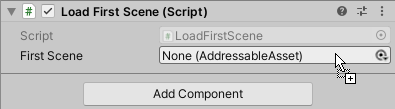
- Drag or assign the asset to an AssetReference field in an Inspector:
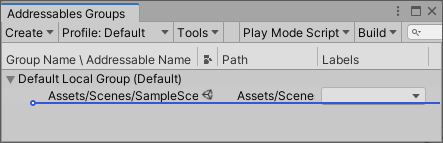
- Drag the asset into a group on the Addressables Groups window:
- Put the asset in a Project folder that's marked as Addressable:

Once you make an asset Addressable, the Addressables system adds it to a default group, unless you place it in a specific group. Addressables packs assets in a group into AssetBundles according to your group settings when you make a content build. You can load these assets using the Addressables API.
Note
If you make an asset in a Resources folder Addressable, Unity moves the asset out of the Resources folder. You can move the asset to a different folder in your Project, but you cannot store Addressable assets in a Resources folder.